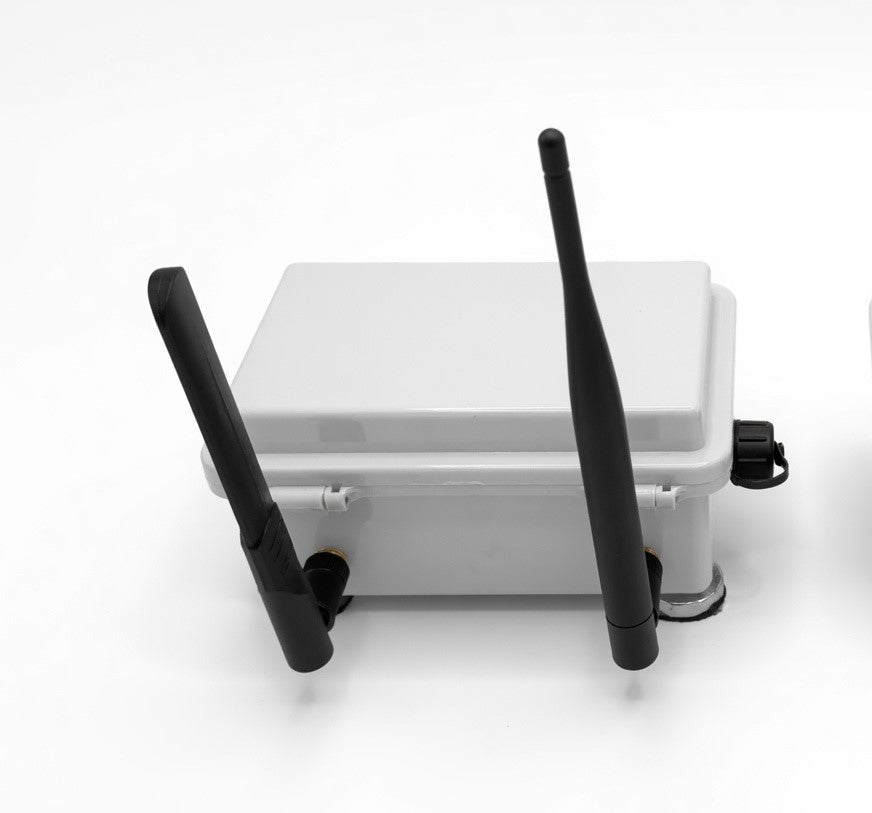
Drone-Mapper
Drone-Mapper Detector — Additional Remote Node
Drone-Mapper Detector — Additional Remote Node
Couldn't load pickup availability
More coverage. Same system. Plug in and detect.
Add a Drone-Mapper Detector to extend the airspace your system can see. Each Detector listens for Remote ID broadcasts in the field and relays detections back to your existing Home Node over the wireless mesh — where they are deduplicated and displayed in Drone-Mapper on your command screen.
This is an expansion node only. It is designed for customers who already operate a Drone-Mapper system (Home Node + software). No additional software license is required — your existing Drone-Mapper Local License covers every Detector on your account.
What’s in the Box
| Item | Qty |
|---|---|
| Drone-Mapper Detector (pre-assembled, pre-configured) | 1 |
| Power kit (Solar or USB — see below) | 1 |
Each Detector ships ready to deploy — pre-wired, pre-flashed, and pre-configured to join your existing mesh network. Power it on, place it in the field, and it appears on your map.
Not included: Home Node, Drone-Mapper software, computer, or USB data connection to your command post. Those come with your starter kit or are purchased separately.
Power Options
Choose how your Detector is powered in the field:
| Option | Best for | Included |
|---|---|---|
| Solar Kit | Standalone field deployment — rooftops, ridgelines, remote perimeters, trail sites, and other locations without nearby power | Solar panel, internal battery, and integrated charging — runs independently off-grid |
| USB Power | Sites with power nearby — buildings, vehicles, command posts, or fixed mounts within cable reach | 30-foot USB power cable. No internal battery — powered continuously from your USB source |
Solar Kit: Mount the panel with clear sky exposure. The internal battery keeps the Detector running through cloudy periods and overnight. Ideal for set-and-forget coverage without running a power line to the install site.
USB Power: Run the included 30-foot cable from a USB power adapter, vehicle port, or other 5V USB source. Simple and reliable when power is already at or near the location.
How It Fits Your System
Drone-Mapper Detector (new location) → wireless mesh → your existing Home Node → USB → Drone-Mapper on your PC
- Deploy the Detector at your new coverage point — opposite side of a campus, along a perimeter, on a ridgeline, at a secondary entry, and more.
- Power it on. It automatically joins your existing mesh and begins listening for Remote ID.
- Watch Drone-Mapper. The new node appears in your Nodes panel and on the map. Detections from its coverage area flow into your live map, timeline, and logs — deduplicated at your Home Node so you still see one aircraft, not duplicates.
No reconfiguration of your Home Node or software is required. Additional Detectors arrive compatible with your existing network.
Why Add More Detectors?
- Extend range — cover areas beyond a single Detector’s listening radius
- Fill blind spots — terrain, buildings, and distance all limit what one point can hear
- Multi-point awareness — see which part of your perimeter detected an aircraft first
- Scale with your operation — add nodes as your site, event, or organization grows
- No extra software cost — your existing Drone-Mapper license covers unlimited Detectors
What You’ll See in Drone-Mapper
Each Detector is tracked individually in your software:
- Unique node ID — every detection is tagged with which Detector heard it
- Node status — ONLINE or STALE in the Nodes panel
- Map marker — Detector location shown on the live map (when GPS is available)
- Detection counts — total and last-detection timestamps per node
- Custom naming — assign a display name and map icon to each Detector
Requirements
| Requirement | Details |
|---|---|
| Existing Drone-Mapper system | Home Node + Drone-Mapper software (Local License) already in operation |
| Mesh compatibility | Detector ships pre-configured for your network. Detectors purchased from us are plug-and-play with your existing nodes |
| Power | Solar Kit: clear sky exposure recommended. USB Power: continuous 5V USB source required — no battery backup |
| Placement | Elevated, line-of-sight positions improve detection range. Avoid metal enclosures and heavy RF shielding where possible |
Quick Start
- Choose your power option and mount the Detector at the new coverage location.
-
Solar Kit: Confirm panel has clear sky exposure and secure the mount.
USB Power: Connect the 30-foot cable to your USB power source. - Power on the Detector.
- Open Drone-Mapper on your command computer — the new node should appear in the Nodes panel within a few minutes.
- Optionally assign a display name and map icon in the Nodes panel so operators can identify it quickly.
Warranty
Standard 1-year hardware warranty from date of delivery, covering defects in materials and workmanship under normal use. Founding Members who purchased under the 2-year warranty program should contact support with their original order details.
Important Notes
- This product is a field Detector only — it does not include a Home Node, software license, or command-post hardware.
- Detection range depends on aircraft transmit power, environment, and placement. Line-of-sight and proximity improve results.
- Drone-Mapper logs what aircraft broadcast via Remote ID. It does not detect aircraft that are not transmitting.
- Solar Kit runtime depends on sun exposure, weather, and install angle.
- Want remote viewing from anywhere at yourorg.drone-mapper.com? That requires the optional Drone-Mapper Remote Access subscription on your command computer — not a per-Detector add-on.
Summary
One more set of ears in the field. Zero changes at base.
The Drone-Mapper Detector expands where your system can listen — pre-configured, field-ready, and fully integrated with the Drone-Mapper you already run.
Requires an existing Drone-Mapper system (Home Node + software). Choose Solar Kit or USB Power. Standard 1-year hardware warranty included.
Share